


White Streaks Parallel to the Paper Feed Direction
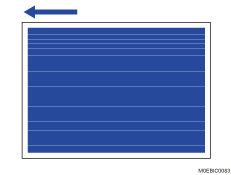
A white streak appears in parallel to the paper feed direction.
Cause:
A trace of abrasive streaks produced by the fusing belt smoothing operation remains on the fusing belt.
This is prone to occur when using paper with a thickness of Paper Weight 7, 8 or 9.
Solution:
 If the paper is not registered as custom paper, register the brand of the paper.
 In [Detailed settings] for custom paper, select 1232: [Fusing Temperature] and increase the temperature setting for the fusing heat roller by 5°C according to the color mode you wish to use.
1232-01: Fusing Temperature: BW/FC/FCS: Heat Roller Temp
1232-06: Fusing Temperature: FCS: Heat Roller Temp: Clear/Special
1232-07: Fusing Temperature: FCS: Heat Roller Temp: White
1232-08: Fusing Temperature: FCS: Heat Roller Temp: Metallic
1232-26: Fusing Temperature: S: Heat Roller Temp: Clear/Special
1232-27: Fusing Temperature: S: Heat Roller Temp: White
1232-28: Fusing Temperature: S: Heat Roller Temp: Metallic
1232-46: Fusing Temperature: BW/FC/FCS: Fuser Setting HQ: Heat Roller Temp
1232-51: Fusing Temperature: FCS: Fuser Setting HQ: Heat Roller Temp: Clear/Special
1232-52: Fusing Temperature: FCS: Fuser Setting HQ: Heat Roller Temp: White
1232-53: Fusing Temperature: FCS: Fuser Setting HQ: Heat Roller Temp: Metallic
1232-71: Fusing Temperature: S: Fuser Setting HQ: Heat Roller Temp: Clear/Special
1232-72: Fusing Temperature: S: Fuser Setting HQ: Heat Roller Temp: White
1232-73: Fusing Temperature: S: Fuser Setting HQ: Heat Roller Temp: Metallic
 Print 20 or more A4 sheets. Has the problem been resolved?
Yes | Finished! |
No | Start over from Step 2. If the problem persists even when the fusing heat roller's temperature is increased the upper limit, contact your service representative. |

The upper limit for the fusing heat roller's temperature depends on the print speed
At normal/constant speed, the upper limit is 185°C
At low speed, the upper limit is 200°C.
Select "Clear/Special" when using Neon Yellow, Neon Pink, or Invisible Red. Select "Metallic" when using Gold or Silver.
After performing the solution, it is recommended to perform the color calibration of the external printer controller.