


White Stain at the Trailing Edge of the Image Using the Special Toner (White)
When printing is performed with the special toner (white), horizontal white streaks appear in the area around 1 mm of the trailing edge of the white toner layer.
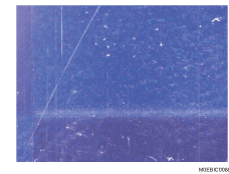
Cause:
The special toner (white) blotches in the area around 1 mm of the trailing edge, resulting in a fusing error due to an excessive use of white toner in that area.
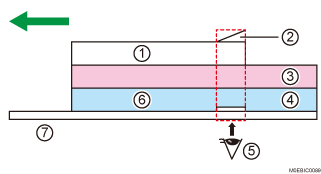
White
White toner blotching at the trailing edge
Magenta
Cyan
Appearing whitish
Insufficient fusing
Transparent sheet
Occurrence conditions:
When printing an image overlaying the white toner with the cyan, magenta, yellow, or black toner
When using transparent paper
When the cyan, magenta, yellow, or black toner overlaying with the white toner is thick
When the cyan, magenta, yellow, or black toner is used at the trailing edge of an image using the white toner
Solution:
 If the paper is not registered as custom paper, register the brand of the paper.
 In [Detailed settings] for the custom paper you are using, select 1201: [Max Image Density], and then decrease the value in 05: [Clear/Special] by 1.
 Print the image. Has the problem been resolved?
Yes | Finished! |
No | Start over from Step 2. If the problem persists, there is no other solution. |

After performing the solution, it is recommended to perform the color calibration of the external printer controller.