


Horizontal (Cross-track) White Streaks across the Paper
Thin horizontal white streaks 1-8 mm (0.04-0.3 inches) long appear across the paper.
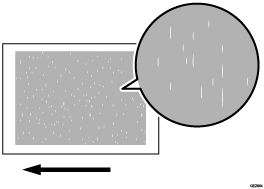
Cause:
This is caused by an abnormal electrical discharge in a low temperature and low humidity environment due to the stains on the charge roller.
Occurrence conditions:
When printing single-color dot image
When printing is performed in a low-temperature environment (the problem is resolved as the temperature inside the machine increases)
When printing 20,000 sheets per day for 15 consecutive days, or when printing 30,000 sheets per day for 8 consecutive days
After printing approximately 30,000 sheets per day for approximately 8 consecutive days
Solution:
 To identify the affected color, print three full-page, halftone A3 or DLT sheets for each of cyan, magenta, and yellow.
 Detach the charge unit of the affected color and wipe the charge roller with a well-wrung-out damp cloth.
 Wipe a dry, unused, lint-free cloth until no moisture remains.
 Print the image. Has the problem been resolved?
Yes | Finished! |
No | Replace the charge unit. |

After performing the solution, it is recommended to perform the color calibration of the external printer controller.