


Horizontal (Cross-track) Black Streaks at the Edge of the Image
The horizontal column density fluctuates at 11 mm (0.4 inches) intervals on the right edge perpendicular to the paper feed direction. This fluctuation does not occur in the area that is 90 mm (3.6 inches) or less from the trailing edge.
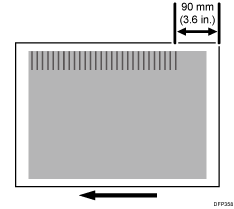
Cause:
The line speed of the transfer timing roller is slower than that of the paper transfer roller, causing the pieces of paper to pull each other and come in and out of contact with the front of the paper transfer nip, resulting in uneven density.
Occurrence conditions:
Printing is performed at low temperature or humidity
Halftone images are printed
Solution:
 If the paper is not registered as custom paper, register the brand of the paper.
 In [Detailed settings] for custom paper, select 1341: [Motor Speed].
 Check if the line speed of the transfer timing roller is set to 0.5% or higher.
Yes | No further improvement is likely. |
No | Go to the next step. |
 Increase the line speed of the transfer timing roller by 0.1%.
 Print the image. Has the problem been resolved?
Yes | Finished! |
No | Start over from Step 4. |

Increasing the speed of the transfer timing roller may cause a change in density in the area 90 mm (3.6 inches) from the trailing edge of the paper.