


Vertical (In-track) White Streaks (Glossy)
Cause:
Due to the reduced lubricant on the intermediate transfer belt and increased toner adhesion, the paper transfer is affected, causing vertical streaks.
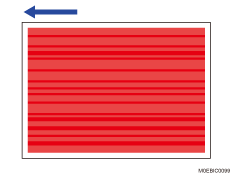
Occurrence conditions:
When printing images covering a high image area with a lot of toner continuously printing
When printing is performed on coated paper
When printing is performed in a hot and humid environment
Solution:
 In the [Machine: Maintenance] group on the [Operator Adjust.] menu, execute 0501: [Execute Process Adjustment].
The problem is resolved by performing this up to five times or so.
 Feed blank paper.
The problem is resolved by feeding approximately 50 sheets.