


Horizontal Streaks in the Area 280-300 mm (11-11.8 inches) from the Leading Edge of the Paper (Shock Jitter When Using Stiff Paper)
When printing is performed on very stiff paper, a streak appears in the area 280-300 mm (11-11.8 inches) from the leading edge of the paper.
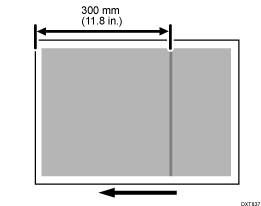
Cause:
Paper transfer is affected due to the jitter produced when the leading edge of the stiff paper is fed through the fusing unit, causing streaks in the paper transfer roller nip.
Solutions:
 Load the paper with its grain direction perpendicular to the paper feed direction.
 Print the image. Has the problem been resolved?
Yes | Finished! |
No | Go to the next step. |
 If the paper is not registered as custom paper, register the brand of the paper.
 In [Detailed settings] for the custom paper you are using, select 1341: [Motor Speed], and then check the present value in 02: [Paper Transfer Belt]. Is it lower than 0.5%?
Yes | Go to the next step. |
No | No further improvement is likely. |
 Increase the value in [Paper Transfer Belt] by 0.1%.

Errors may occur depending on the degree of adjustment and conditions. In such a case, contact your service representative.
Decreasing the paper transfer roller speed may cause the image to expand or contract in the subscanning direction. Such a problem may be resolved by increasing the value for [Image Magnification] in [Manual Adjustment] in [Adjust image position] on the [Media] hub.
 Print the image. Has the problem been resolved?
Yes | Finished! |
No | Start over from Step 5. If the problem persists even after increasing the value to 0.5%, there is no other solution. |