


Horizontal Streaks of Uneven Density (Low-Resistance Paper)
When printing is performed on low-resistance paper such as metallic paper or black paper, horizontal streaks of uneven density appear in the area approximately 85 mm (3.3 inches) from the trailing edge of the paper.
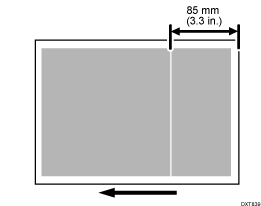
Cause:
The paper transfer current tends to be transferred from the paper surface to the transfer timing roller and results in fluctuations in the paper transfer bias, causing streaks and uneven density.
Solutions:
 If the paper is not registered as custom paper, register the brand of the paper.
 In [Detailed settings] for the custom paper you are using, select 1214: [Paper Transfer Output], and then adjust the values in the following settings in steps of ±1 according to the mode in use.
1214-01: Paper Transfer Output: BW: Side 1
1214-02: Paper Transfer Output: BW: Side 2
1214-05: Paper Transfer Output: FC/FCS: Side 1
1214-06: Paper Transfer Output: FC/FCS: Side 2
1214-09: Paper Transfer Output: FCS: Side 1
1214-10: Paper Transfer Output: FCS: Side 2
1214-13: Paper Transfer Output: S: Side 1: Clear/Special
1214-14: Paper Transfer Output: S: Side 1: White
1214-15: Paper Transfer Output: S: Side 1: Metallic
1214-17: Paper Transfer Output: S: Side 2: Clear/Special
1214-18: Paper Transfer Output: S: Side 2: White
1214-19: Paper Transfer Output: S: Side 2: Metallic
 Print the image. Has the problem been resolved?
Yes | Finished! |
No | Go to the next step. |
 In 1214: [Paper Transfer Output], further adjust the values in the applicable settings in steps of ±1.
 Print the image and check if there are any problems such as faintness or white spots.
Yes | No further improvement is likely. |
No | Finished! |

Select "Clear/Special" when using Neon Yellow, Neon Pink, or Invisible Red. Select "Metallic" when using Gold or Silver.