


Horizontal Streaks (Synthetic Paper)
When printing halftone images is performed synthetic paper, multiple white streaks appear perpendicular to the paper feed direction.
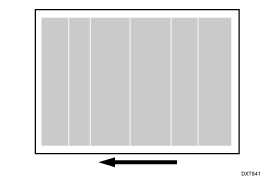
Cause:
The electrical charge on high-resistance paper is high. When such paper enters the fusing nip, toner blasting occurs due to electrical discharge, resulting in horizontal streaks.
Occurrence conditions:
When printing is performed on synthetic or other high-resistance paper
Printing is performed at low temperature or humidity
Halftone images are printed
Solutions:
 If the paper is not registered as custom paper, register the brand of the paper.
 In [Detailed settings] for the custom paper you are using, select 1214: [Paper Transfer Output], and then adjust the values in the following settings in steps of ±1 according to the mode in use.
1214-01: Paper Transfer Output: BW: Side 1
1214-02: Paper Transfer Output: BW: Side 2
1214-05: Paper Transfer Output: FC/FCS: Side 1
1214-06: Paper Transfer Output: FC/FCS: Side 2
1214-09: Paper Transfer Output: FCS: Side 1
1214-10: Paper Transfer Output: FCS: Side 2
1214-13: Paper Transfer Output: S: Side 1: Clear/Special
1214-14: Paper Transfer Output: S: Side 1: White
1214-15: Paper Transfer Output: S: Side 1: Metallic
1214-17: Paper Transfer Output: S: Side 2: Clear/Special
1214-18: Paper Transfer Output: S: Side 2: White
1214-19: Paper Transfer Output: S: Side 2: Metallic
 Print the image. Has the problem been resolved?
Yes | Finished! |
No | Go to the next step. |
 In 1214: [Paper Transfer Output], further adjust the values in the applicable settings in steps of ±1.
 Print the image and check if there are any problems such as faintness or white spots.
Yes | No further improvement is likely. |
No | Finished! |

Select "Clear/Special" when using Neon Yellow, Neon Pink, or Invisible Red. Select "Metallic" when using Gold or Silver.