


Horizontal Black Bands in the Area 60 mm (2.3 inches) from the Leading Edge of the Paper (Metallic Paper)
Halftone black bands perpendicular to the paper feed direction appear in the area 60 mm (2.3 inches) from the leading edge of the paper.
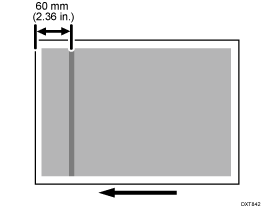
Cause:
Due to the characteristics of the metallic paper, such as stiffness, slipperiness, and the difference in smoothness between the front and back of the paper, the paper feed speed fluctuates at the paper transfer roller nip, causing this problem.
Solutions:
 If the paper is not registered as custom paper, register the brand of the paper.
 In [Detailed settings] for custom paper, select 1341: [Motor Speed], and check the value in 02: [Paper Transfer Belt].
If it is "0.5%" or below, go to the next step.
If not, there is no other solution.
 Increase the value in [Paper Transfer Belt] by 0.1%.
 Print the image. Has the problem been resolved?
Yes | Finished! |
No | Start over from Step 2. |