


Insufficient Gloss: Clear Image
Blurred images appear when printing is performed in clear mode (special toner).
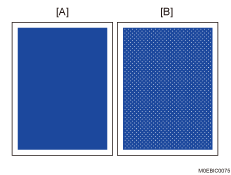
[A] Normal
[B] When blurred
Cause/Occurrence conditions:
The fusing temperature is too low and the gloss is insufficient in the areas using the special toner (clear).
This is prone to occur when printing is performed in the mode for the special toner (clear) on thick paper such as that with Paper Weight 7 or 8.
Solution:
 If the paper is not registered as custom paper, register the brand of the paper.
 In [Detailed settings] for custom paper, select 1232: [Fusing Temperature] and increase the temperature setting for the fusing heat roller by 5°C according to the color mode you wish to use.
Productivity Priority
1232-01: Fusing Temperature: BW/FC/FCS: Heat Roller Temp
1232-06: Fusing Temperature: FCS: Heat Roller Temp: Clear/Special
1232-07: Fusing Temperature: FCS: Heat Roller Temp: White
1232-08: Fusing Temperature: FCS: Heat Roller Temp: Metallic
1232-26: Fusing Temperature: S: Heat Roller Temp: Clear/Special
1232-27: Fusing Temperature: S: Heat Roller Temp: White
1232-28: Fusing Temperature: S: Heat Roller Temp: Metallic
High Quality
1232-46: Fusing Temperature: BW/FC/FCS: Fuser Setting HQ: Heat Roller Temp
1232-51: Fusing Temperature: FCS: Fuser Setting HQ: Heat Roller Temp: Clear/Special
1232-52: Fusing Temperature: FCS: Fuser Setting HQ: Heat Roller Temp: White
1232-53: Fusing Temperature: FCS: Fuser Setting HQ: Heat Roller Temp: Metallic
1232-71: Fusing Temperature: S: Fuser Setting HQ: Heat Roller Temp: Clear/Special
1232-72: Fusing Temperature: S: Fuser Setting HQ: Heat Roller Temp: White
1232-73: Fusing Temperature: S: Fuser Setting HQ: Heat Roller Temp: Metallic
 Print on 10 or more sheets of A4 paper, short edge feed (SEF), to check if the image is within the acceptable range.
Yes | Go to the next step |
No | Start over from Step 2. If the print result exceeds the acceptable range even after increasing the heat roller temperature to 185°C (at the standard/ medium print speed) or 200°C (at the low print speed), there is no other solution. |
 Is the paper curled?
 Check if the curl is within the acceptable range.
Yes | Finished! |
No | Go to the next step. |
 In [Detailed settings] for custom paper, select 1321: [Correct Paper Curl], and then execute decurling.
To correct curls facing up, specify "U Curl Correction Level: Large" or "U Curl Correction Level: Small".
To correct curls facing down, specify "П Curl Correction Level: Large" or "П Curl Correction Level: Small".
 Print the image. Has the problem been resolved?
Yes | Finished! |
No | Repeat Steps 6 and 7. If the problem persists, there is no other solution. |

Select "Clear/Special" when using Neon Yellow, Neon Pink, or Invisible Red. Select "Metallic" when using Gold or Silver.
After performing the solution, it is recommended to perform the color calibration of the external controller.