


Faint Oval Spots at Paper Edges
Oval white spots appear at the positions of the paper feed tray's fans (at the leading, trailing, and side edges of paper).
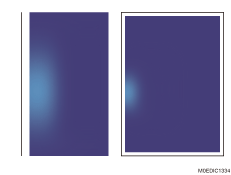
Cause:
The part of the paper feed tray exposed to the fan's blown air is dry, causing a difference in the moisture (friction) on the paper surface.
The lack of paper transfer bias at the dried part of the paper feed tray exposed to the fan's blown air causes paper transfer failure.
Occurrence conditions:
High coverage solid image
Low temperature and low humidity operational environment
Thick paper
Paper stored in a low humidity environment
Long lapse of time before printing; moisture content in paper decreases considerably while the fans continue to blow air against the paper
Solution:
Notes on managing Paper
Keeping the paper in a low humidity environment or exposing the paper to the paper feed tray's airflow may cause insufficient print density. This may be reduced by keeping the paper in a non-low-humidity environment.
This may be reduced/prevented by storing the paper in a non-low-humidity environment in advance.
Notes on Managing the Temperature and Humidity
When printing in low humidity environments, the problem may be reduced/prevented by avoiding the dropping of the ambient temperature.