


White Streaks When Printing on Cast-Coated Paper
Raindrop-like white streaks occur when printing is performed on cast-coated paper.
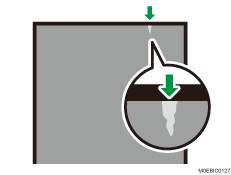
Cause:
This is caused by condensation.
The following are possible causes.
Since the printed surface is impervious to moisture, a lot of water vapor is generated from the opposite side (back of the paper).
Condensation is formed at the pressure roller separation pawls downstream of the fusing unit.
Condensation forms water droplets that adhere to the pressure roller downstream of the fusing unit.
With the pressure roller rotating halfway around, the water droplets are carried to the fusing nip entrance.
The water droplets are retained by the wiper effect of the nip.
As the leading edge of the next sheet of paper enters the fusing nip, the unfused image is disturbed by the water droplets.
Occurrence conditions:
When printing on cast-coated paper
When paper is stored in a humid environment
When the printer has been in standby mode for more than 20 minutes
Solution:
Do not store paper in a humid environment.
Store paper in moisture-proof packaging.
Increase the fusing temperature
The higher you increase the fusing temperature, the more likely it is that solid-fill images are troubled by orange peel (uneven toner density). Increase the temperature in steps of 10 °C while checking the printed image. It is recommended to keep the temperature within +50 °C from the default and to not exceed it.