


When Using Transparent Film
White spots appear at the trailing edge when printing is performed on a transparent film.
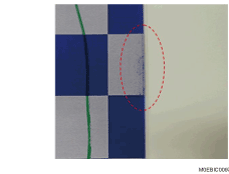
Cause:
This may occur when toner is compressed and causes blotching at the sides of the paper (transparent film) during paper transfer.
Occurrence conditions:
When printing on slippery transparent film
When printing high image density images in high resolution mode in full color + special toner (clear) or in full color + special color (white)
Solution:
Position the image 5 mm (0.2 inches) or more away from the edge. Adjust the settings as follows:
 Adjust the value for [Adjust image position] in [Manual Adjustment] in [Adjust image position] on the [Media] hub.
 Adjust the image data position.
 Use paper with substantial margins.

After performing the solution, it is recommended to perform the color calibration of the external printer controller.