


Mottling of Uneven Density on Half-Tone Images
Mottling occurs in halftone sections.
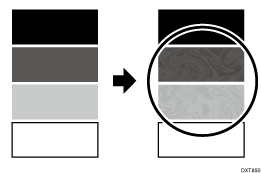
Cause:
Occurs when the speed of the intermediate transfer belt and the speed of the paper feed are different.
Solution:
 If the paper is not registered as custom paper, register the brand of the paper.
 In [Detailed settings] for custom paper, select 1341: [Motor Speed] and check the value in 02: [Paper Transfer Belt].
If it is "0.5%" or below, go to the next step.
If not, there is no other solution.
 Decrease the value in [Paper Transfer Belt] by 0.1%.

Errors may occur depending on the degree of adjustment and conditions. In such a case, contact your service representative.
Decreasing the paper transfer roller speed may cause the image to expand or contract in the subscanning direction. Such a problem may be resolved by increasing the value for [Image Magnification] in [Manual Adjustment] in [Adjust image position] on the [Media] hub.
 Print the image. Has the problem been resolved?
Yes | Finished! |
No | Start over from Step 2. |