


Faint Small Solid-Fill Images
The small solid-fill images are faint or have streaks on them.
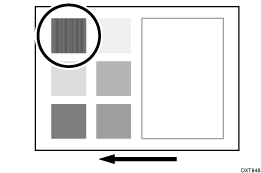
Cause:
At high temperature and humidity, the toner static charge is prone to be low. If a small-size solid-fill color image is printed, the charge becomes insufficient during intermediate (image) transfer, resulting in deteriorated paper transferability.
Solution:
 If the paper is not registered as custom paper, register the brand of the paper.
 In [Detailed settings] for custom paper, select 1212: [Image Transfer Output] and increase the value by one step.
1212-03: Image Transfer Output: FC/FCS: Cyan
1212-04: Image Transfer Output: FC/FCS: Magenta
1212-05: Image Transfer Output: FC/FCS: Yellow
 Print the image. Has the problem been resolved?
Yes | Finished! |
No | Go to the next step. |
 Has the image quality improved?

If uncertain, set the prior value of 1212: [Image Transfer Output] to "+5", and then confirm the image quality.
Depending on the paper, it may be difficult to see the effect of just increasing the value by one step. As required, increase the value up to +5 from the default value to check for improvement.
If the value is increased too high, negative ghosting may occur, or conversely, the images may become faint, so check for these problems as well.
Yes | Start over from Step 2. If a satisfactory image density cannot be achieved even after increasing the value to the upper limit, restore the setting with the best result, and then go to the next step. |
No | Go to the next step. |
 In the [Machine: Maintenance] group on the [Operator Adjust.] menu, select 0506: [Execute Developer Refreshing], and then execute 01: [KCMY].
 Print the image. Has the problem been resolved?
Yes | Finished! |
No | No further improvement is likely. |