


Uneven Density within 90 mm (3.5 inches) of the Trailing Edge
Printing in the area extending approximately 90 mm (3.5 inches) from the trailing edge is fainter or denser.
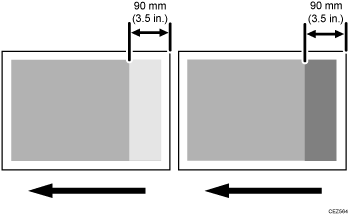
Occurrence conditions:
Printing is done at low temperature or humidity
Solution:
 If the paper is not registered as custom paper, register the brand of the paper.
 In [Detailed settings] for custom paper, select 1341: [Motor Speed], and then decrease the line speed of the 01: [Transfer Timing Roller] by 0.1%.
 Check to see if uneven density has been resolved.
Yes | Finished! |
No | Start over from Step 2. Decrease the value in steps of 0.1% within the range down to -0.5%, and then apply the optimal result. |

If the problem worsens, conversely increase the line speed of the transfer timing roller in steps of 0.1% within the range up to 0.5%, and then apply the optimal result.
If the print result is unsatisfactory even after adjusting the value within ±0.5%, there is no other solution.
If no change is observed after changing the value, restore the previous setting.