


Deterioration of Graininess in Halftone Areas
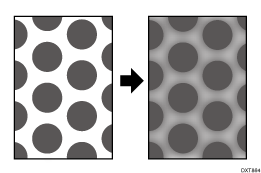
Cause:
This may occur if:
Printing is performed after the machine is left idle for a while.
Printing is done at high temperature or humidity
Documents with a small image area are printed continuously.
The developer’s electrostatic property diminishes, causing the toner adhesion to increase. If this happens, the shapes of half-tone image dots may be degraded and luster (dot height) may be uneven.
Solution:
 In the [Machine: Maintenance] group on the [Operator Adjust.] menu, execute 0506: [Execute Developer Refreshing].
 Print the image. Has the problem been resolved?
Yes | Finished! |
No | Go to the next step. |
 Set the value of halftone screen frequency in the print setting to "175" or "200".
 Print the image. Has the problem been resolved?
Yes | Finished! |
No | No further improvement is likely. Contact your service representative. |