


Toner Stains of Mixed Colors (Horizontal Streaks)
Multi-color toner stains occur in the form of horizontal streaks.
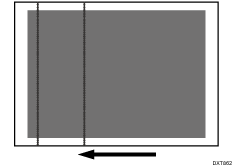
Cause:
If printing starts after the machine is left in a low temperature environment for a while, the toner accumulated on the cleaning blade of the intermediate transfer belt cleaning unit is not sufficiently removed, resulting in mixed-color toner stains.
Solution:
 Increase the ambient temperature of the machine’s environment.
Increase the temperature to approximately 20°C (68°F) or higher.
 Leave the machine in that condition for 30 minutes or more before printing.
 Print the image. Has the problem been resolved?
Yes | Finished! |
No | Go to the next step. |
 Set the machine's anti-condensation heater (option) switch to "ON".
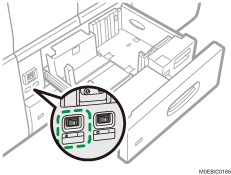
 Print the image. Has the problem been resolved?
Yes | Finished! |
No | Go to the next step. |
 Set Energy Saver mode and other energy-saving modes to "Off".
 Print the image. Has the problem been resolved?
Yes | Finished! |
No | Go to the next step. |
 Replace ITB Cleaning Unit.
 Print the image. Has the problem been resolved?
Yes | Finished! |
No | No further improvement is likely. Contact your service representative. |