


Stains on the Area up to 204 mm (8 inches) Away from the Leading Edge of the Paper (Transparent Film, etc.)
When printing is performed on transparency film, stains may appear from the leading edge to 204 mm (8 inches) inwards.
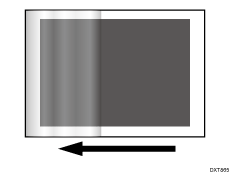
Cause:
When solid-fills or other images with high coverage are printed, substantial toner wax adheres to the fusing belt. The adhered toner wax goes around to the surface of the pressure roller, and due to it not being removed in time, toner wax stains occur from the leading edge of the paper on the back of the next page up to the area away by one rotation of the pressure roller.
Solution:
 If the paper is not registered as custom paper, register the brand of the paper.
 Adjust the paper feed interval. This will decrease the throughput, but is it OK?
Yes | Go to the next step. |
No | Contact your service representative. |
 In [Detailed settings] for the custom paper you are using, select 1237: [Print Speed (Sheet Interval Adj)], and then decrease the value in the following corresponding settings by 20%.
1237-01: Print Speed (Sheet Interval Adj): BW/FC/FCS: BW/FC/FCS
1237-02: Print Speed (Sheet Interval Adj): FCS: Clear/Special
1237-03: Print Speed (Sheet Interval Adj): FCS: White
1237-04: Print Speed (Sheet Interval Adj): FCS: Metallic
For example, if the present value is "100%", change it to "80%".
 Print 2 or more sheet. Has the problem been resolved?
Yes | Finished! |
No | Repeat Step 3 to 4. If the problem still persists, contact your service representative. |

Select "Clear/Special" when using Neon Yellow, Neon Pink, or Invisible Red. Select "Metallic" when using Gold or Silver.