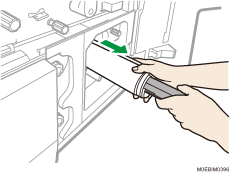
When Using the Paper Remover to Remove Jammed Paper
When a paper jam occurs in B1, follow the procedure described in the animation, and remove the banner paper using the paper remover. Also, you can use the paper remover to remove jammed paper when a paper jam occurs in the option, or when a paper jam of paper other than the banner paper cannot be removed properly.
 Following the procedure that is shown in the animation, open the front cover, and then lower the lever.
 Insert the leading end of the paper remover between the guide board and the jammed paper, and clip the jammed paper securely.
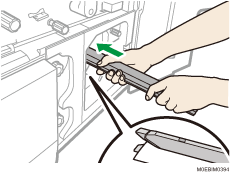
Insert the paper remover straight. If the remover is pushed forcefully, the paper may get ripped, or get warped, making it harder to clip securely.
If the paper remover is difficult to insert, hook your finger around the edge of the jammed paper, creating a deflection, and then insert the remover.
Push in the paper remover until the metal part of the remover is pushing against the jammed paper.
 Rotate the paper remover clockwise to wrap the jammed paper around the remover.
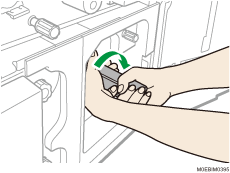
 Once the jammed paper is wrapped around the paper remover completely, pull the remover toward you.