


Printable Area and Margin
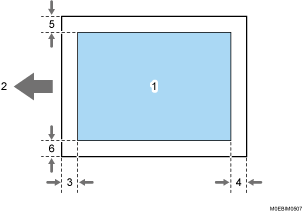
Print area
Feed direction
Left margin (varies depending on the paper type)
Non-coated paper:
Approx. 7.0 ± 0.5 mm (0.3 ± 0.02 inches) for paper weight 0, approx. 5.0 ± 0.5 mm (0.2 ± 0.02 inches) for paper weight 1 to 3, and approx. 4.0 ± 0.5 mm (0.16 ± 0.02 inches) for paper weight 4 to 9
Coated paper:
Approx. 7.0 ± 0.5 mm (0.28 ± 0.02 inches) for paper weight 1 to 2, approx. 5.0 ± 0.5 mm (0.2 ± 0.02 inches) for paper weight 3, and approx. 4.0 ± 0.5 mm (0.16 ± 0.02 inches) for paper weight 4 to 9
Right margin (varies depending on the paper type)
Non-coated paper:
Approx. 7.0 ± 0.5 mm (0.3 ± 0.02 inches) for paper weight 0, approx. 5.0 ± 1.0 mm (0.2 ± 0.04 inches) for paper weight 1 to 3, and approx. 4.0 ± 1.0 mm (0.16 ± 0.04 inches) for paper weight 4 to 9
Coated paper:
Approx. 7.0 ± 1.0 mm (0.28 ± 0.04 inches) for paper weight 1 to 2, approx. 5.0 ± 1.0 mm (0.2 ± 0.04 inches) for paper weight 3, and approx. 4.0 ± 1.0 mm (0.16 ± 0.04 inches) for paper weight 4 to 9
Top margin
Approx. 2.0 ± 1.5 mm (0.08 ± 0.06 inches)
Bottom margin
Approx. 2.0 ± 1.5 mm (0.08 ± 0.06 inches)

The machine does not support edge-to-edge printing. To minimize the margins, specify the maximum printable area with the settings on the printer driver.
The printable area may vary due to the paper size or settings of the printer driver.
The outside of the printable area can be printed due to the settings of the printer driver or printing condition; however, the print result may be different from the intended one or the paper may not be fed correctly.