


Machine Options
Guide to Functions of the Machine’s External Options
For the product names of options, see Abbreviated Names of Options.
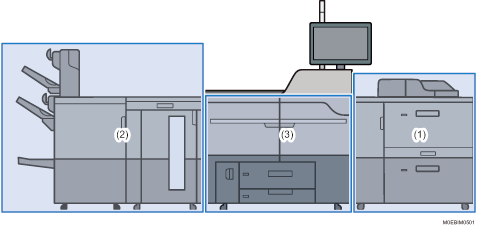
(1) Options Mounted to the Machine’s Right Side Section
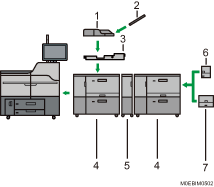
No. | Option | Description |
|---|---|---|
1 | Multi bypass tray (Tray A) | Holds up to 500 sheets of paper. |
2 | Banner sheet tray of multi bypass tray (Tray A) | Allows you to load large-sized paper in the multi bypass tray (Tray A). |
3 | Multi bypass attachment kit | Attaches the multi bypass tray (Tray A) to the wide LCT. |
4 | Wide LCT | Holds up to 4,800 sheets of paper. You can load paper whose sizes are up to SRA3 or 13 × 191/5. You can connect up to three wide LCTs. |
5 | Bridge unit of wide LCT | Connects a wide LCT to an additional wide LCT. |
6 | LCT banner sheet tray | Allows you to load large-sized paper in the wide LCT. |
7 | Extension LCT banner sheet tray | Larger paper can be loaded on the wide LCT than when LCT banner sheet tray is attached. |
(2) Options Mounted to the Machine’s Left Side Section
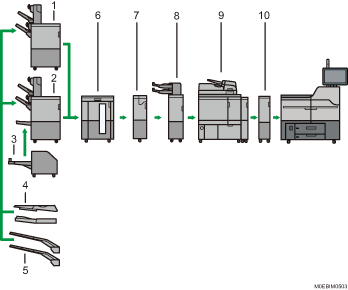
No. | Option | Description |
|---|---|---|
1 | Finisher | Sorts, stacks, and staples multiple sheets of paper. Consists of the following paper trays:
Prints can be punched if the optional punch unit is installed on the finisher. |
2 | Booklet Finisher | Sorts, stacks, and staples multiple sheets of paper. The saddle stitch function can staple multiple sheets of paper in the center and fold them into booklets. Consists of the following paper trays:
Prints can be punched if the optional punch unit is installed on the finisher. |
3 | Trimmer unit | Cuts the fore edge of the book block after the book block is saddle stitched. Booklet Finisher is required in order to attach this. |
4 | Output banner sheet tray | Paper that is 139.7–700.0 mm (19.2–27.6 inches) in the horizontal length can be ejected onto the booklet finisher or finisher. |
5 | Extension output banner sheet tray | Paper that is 139.7–1260.0 mm (19.2–49.7 inches) in the horizontal length can be ejected onto the booklet finisher or finisher. |
6 | High capacity stacker | Consists of the following paper trays:
The stacker upper tray can hold up to 250 sheets of paper, and stacker tray can hold up to 5,000 sheets of paper. You can connect up to two high capacity stackers. |
7 | Multi-folding unit | Applies the following folds: Half Fold, Letter Fold-out, Letter Fold-in, and Z-fold. |
8 | Interposer | Inserts cover or slip sheets into printed paper. By attaching the double-feed detection kit for the interposer, the machine is configured to detect double feeds from the interposer. You can attach Finisher or Booklet Finisher together with this. |
9 | Perfect binder | Applies adhesive to the spine of gathered pages to bind them in a booklet. |
10 | Buffer pass unit | Cools printed paper. |
(3) Other Options
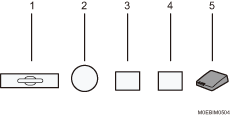
No. | Option | Description |
|---|---|---|
1 | A3/11 × 17 tray unit | You can load paper sizes up to A3 |
2 | 5th station upgrade kit | You can use the special color. |
3 | Toner interchange unit | Exchange the units for the black and special color to print a layer of white toner under other colors. You can print colors vividly in a single path even on dark-colored or metallic paper. |
4 | 5th station replacement unit | You can exchange the special color to be used for another special color. |
5 | Interface box | Allows you to connect extended options to the machine. |
 or 11 × 17
You cannot install multiple finishers simultaneously.
If you have connected two high capacity stackers, you cannot install the multi-folding unit or the perfect binder.
You can install the multi-folding unit only if either finisher or booklet finisher is installed.
You can install the perfect binder only if one of the following options is installed: finisher, booklet finisher, or the high capacity stacker.
The multi bypass tray (Tray A) can be attached only if the wide LCT is installed. However, you can attach the multi bypass tray (Tray A) to the wide LCT only if the multi bypass attachment kit is installed.
When printing on banner paper on the machine with various banner sheet trays attached, the printed paper is ejected with the print side facing up. The appropriate setting in the printer driver or color controller is ignored.
LCT banner sheet tray and extension LCT banner sheet tray cannot be attached at the same time.
When using multiple linked wide LCT, LCT banner sheet tray/extension LCT banner sheet tray can be attached only to the wide LCT that is the furthest from the machine.
When using multiple linked wide LCTs, the multi bypass tray (Tray A) can be attached only to the wide LCT closest to the machine.
To prevent blocking, the buffer pass unit is required.
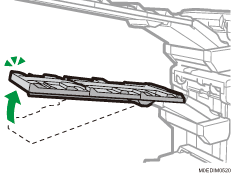
Notes on the tray of extension output banner sheet tray
The tray folds up when force is applied downward on the tip of the tray. Do not push, lean on, or place an object on or near the tip of the tray. Doing so may cause damage or malfunction of the machine.
When the tray folds up, return it to its original position.
Guide to Functions of the Machine's Internal Options/Option Controller
Color controller
You can print documents using the optional controller.
EFI 5th station hardware upgrade kit
You can use the special color on the color controller.
Productivity upgrade unit
The sustained printing speed increases to 95 sheets per minute when you attach the option.