


06: Finishing: Finisher
0601: Staple Position for Booklet
Adjust the horizontal position of the booklet staples when using Booklet Finisher.
Press [ ] to move the position right (across horizontally-spreading pages), or press [
 ] to move it left.
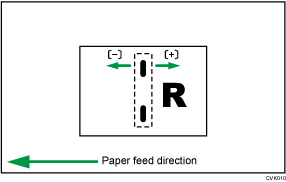
Setting Items | Default Value | Max. Value | Min. Value | Step | Unit |
|---|---|---|---|---|---|
01: A3 SEF 02: B4 JIS SEF 03: A4 SEF 04: B5 JIS SEF 05: SRA3 SEF 06: SRA4 SEF 07: 310 × 432 mm SEF 08: 226 × 310 mm SEF 09: 13 × 191/5 SEF 10: 13 × 19 SEF 11: 13 × 18 SEF 12: 123/5 × 191/5 SEF 13: 123/5 × 181/2 SEF 14: 12 × 18 SEF 15: 11 × 17 SEF 16: 81/2 × 14 SEF 17: 81/2 × 11 SEF 18: 8K SEF 19: 16K SEF 20: Other Paper Sizes 21: 81/2 × 132/5 SEF | 0 | 1 | -1 | 0.1 | mm |
0602: Folding Position for Booklet
Adjust the horizontal position of the folding when using Booklet Finisher.
Press [] to move the position right (across horizontally-spreading pages), or press [] to move it left.
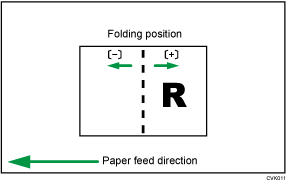
Setting Items | Default Value | Max. Value | Min. Value | Step | Unit |
|---|---|---|---|---|---|
01: A3 SEF 02: B4 JIS SEF 03: A4 SEF 04: B5 JIS SEF 05: SRA3 SEF 06: SRA4 SEF 07: 310 × 432 mm SEF 08: 226 × 310 mm SEF 09: 13 × 191/5 SEF 10: 13 × 19 SEF 11: 13 × 18 SEF 12: 123/5 × 191/5 SEF 13: 123/5 × 181/2 SEF 14: 12 × 18 SEF 15: 11 × 17 SEF 16: 81/2 × 14 SEF 17: 81/2 × 11 SEF 18: 8K SEF 19: 16K SEF 20: Other Paper Sizes 21: 81/2 × 132/5 SEF | 0 | 1 | -1 | 0.1 | mm |
0603: Staple Position: Across Feed 1
Adjust the vertical position of the staple (applied at an edge) when using Finisher or Booklet Finisher.
Press [] to move the stapling position away from the side edge of the sheet or [] to move it toward the edge.

Setting Items | Default Value | Max. Value | Min. Value | Step | Unit |
|---|---|---|---|---|---|
01: A3 SEF 02: B4 JIS SEF 03: A4 LEF 04: A4 SEF 05: B5 JIS LEF 06: B5 JIS SEF 07: 11 × 17 SEF 08: 81/2 × 14 SEF 09: 81/2 × 11 LEF 10: 81/2 × 11 SEF 11: 8K SEF 12: 16K LEF 13: 16K SEF 14: Other Paper Sizes 15: 81/2 × 132/5 SEF | 0 | 2 | -2 | 0.1 | mm |
0604: Staple Position: Across Feed 2
Adjust the vertical position of the staples (dual) when using Finisher or Booklet Finisher.
Press [] to move the two stapling positions away from the center and each other or [] to move them toward each other.
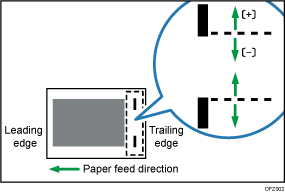
Setting Items | Default Value | Max. Value | Min. Value | Step | Unit |
|---|---|---|---|---|---|
01: A3 SEF | 0 | 115 | -14.5 | 0.5 | mm |
02: B4 JIS SEF | 75 | ||||
03: A4 LEF | 115 | ||||
04: A4 SEF | 28 | ||||
05: B5 JIS LEF | 75 | ||||
06: B5 JIS SEF | 0 | ||||
07: 11 × 17 SEF | 98 | ||||
08: 81/2 × 14 SEF | 34 | ||||
09: 81/2 × 11 LEF | 98 | ||||
10: 81/2 × 11 SEF | 34 | ||||
11: 8K SEF | 85 | ||||
12: 16K LEF | |||||
13: 16K SEF | 12 | ||||
14: Other Paper Sizes | 115 | ||||
15: 81/2 × 132/5 SEF | 34 |
0605: Staple Position: With Feed
Adjust the horizontal position of the staples when using Finisher or Booklet Finisher.
Press [] to move the stapling position away from the trailing edge of the sheet or [] to move it toward the edge.
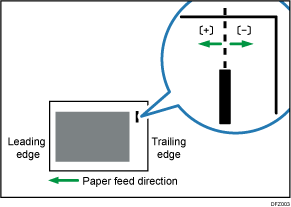
Setting Items | Default Value | Max. Value | Min. Value | Step | Unit |
|---|---|---|---|---|---|
01: A3 SEF 02: B4 JIS SEF 03: A4 LEF 04: A4 SEF 05: B5 JIS LEF 06: B5 JIS SEF 07: 11 × 17 SEF 08: 81/2 × 14 SEF 09: 81/2 × 11 LEF 10: 81/2 × 11 SEF 11: 8K SEF 12: 16K LEF 13: 16K SEF 14: Other Paper Sizes 15: 81/2 × 132/5 SEF | 0 | 2 | -2 | 0.1 | mm |
0606: Punch Position: Across Feed
Adjust the vertical position of the punch holes when using Finisher or Booklet Finisher.
Press [] to move the position forward (up), or [] to move it backward (down).
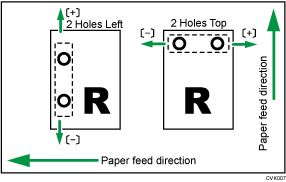
Setting Items | Default Value | Max. Value | Min. Value | Step | Unit |
|---|---|---|---|---|---|
01: 2 Holes JP/EU 02: 3 Holes US 03: 4 Holes EU 04: 4 Holes NE 05: 2 Holes US | 0 | 2 | -2 | 0.5 | mm |
0607: Punch Position: With Feed
Adjust the horizontal position of the punch holes when using Finisher or Booklet Finisher.
Press [] to move the position toward the top edge (left) relative to the paper feed direction, or [] to move it toward the bottom edge (right).
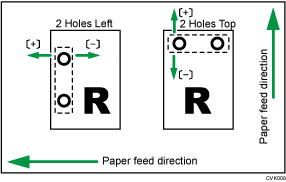
Setting Items | Default Value | Max. Value | Min. Value | Step | Unit |
|---|---|---|---|---|---|
01: 2 Holes JP/EU 02: 3 Holes US 03: 4 Holes EU 04: 4 Holes NE 05: 2 Holes US | 0 | 4 | -4 | 0.5 | mm |
0609: Set Number of Folds for Booklet
Specify the number of booklet folds to be performed when using Booklet Finisher.
You can adjust the paper folding strength by changing the number of folds per the booklet.
When you select "0", the default value, the finisher folds the booklet according to the number of sheets in the booklet, as shown below.
1–6 sheets: 1 time
7–10 sheets: 2 times
11–30 sheets: 6 times
The value set here is added to the default values. Set a negative value to reduce the number of times the finisher folds booklets.
Setting Items | Default Value | Max. Value | Min. Value | Step | Unit |
|---|---|---|---|---|---|
01: Number of Folds for Booklet | 0 | 6 | -6 | 1 | None |
0637: Staple Tray: Rib Installed Mode to Strengthen Paper
Set the operation when the Paper Strengthening Rib is installed to Staple Tray.
This function can be used with Finisher or Booklet Finisher.
Before you set "Setting" to [On], attach the paper strengthening ribs.
Setting Item | Values | Default Value |
|---|---|---|
01: Setting | Off On | Off |
0638: Accuracy Priority for Stapling
Set the accuracy priority for stapling.
This function can be used with Finisher or Booklet Finisher.
Setting Item | Values | Default Value |
|---|---|---|
01: Setting | Speed Priority Accuracy Priority | Speed Priority |
0639: Accuracy Priority for Booklet
Set the accuracy priority for a booklet.
This function can be used with Booklet Finisher.
Setting Item | Values | Default Value |
|---|---|---|
01: Setting | Speed Priority Accuracy Priority | Speed Priority |