


1302: 2-Tray LCIT: Fan/Shutter
Updraft Fan Level
Under conditions below, adjust vacuum fan operation in Wide Large Capacity Tray. Increase the air volume with [+], and decrease it with [-]. [S: - 150/L: 150.1 mm -] [s: - 148/m: 148.1 - 487.7/l: 487.8 - 700/xl: 700.1 mm -]
Setting Item | Max. Value | Min. Value | Step | Unit |
|---|---|---|---|---|
01: Size: Across: S/Feed: s/02: Size: Across: S/Feed: m/03: Size: Across: S/Feed: l/04: Size: Across: L/Feed: s/05: Size: Across: L/Feed: m/06: Size: Across: L/Feed: l/ 07: Size: Across: L/Feed: xl | 100 | 0 | 10 | % |
Blower Fan Level
Under the following conditions, adjust the blower fan operation in Wide Large Capacity Tray. Increase the air volume with [+], and decrease it with [-]. [S: - 150/L: 150.1 mm -] [s: - 148/m: 148.1 - 487.7/l: 487.8 – 700/xl: 700.1 mm -]
Setting Item | Max. Value | Min. Value | Step | Unit |
|---|---|---|---|---|
08: Size: Across: S/Feed: s/09: Size: Across: S/Feed: m/10: Size: Across: S/Feed: l/11: Size: Across: L/Feed: s/12: Size: Across: L/Feed: m/13: Size: Across: L/Feed: l/14: Size: Across: L/Feed: xl | 100 | 0 | 10 | % |
Side Fan Level
Under the following conditions, adjust the side fan operation in Wide Large Capacity Tray. Increase the air volume with [+], and decrease it with [-]. [S: - 150/L: 150.1 mm -] [s: - 148/m: 148.1 - 487.7/l: 487.8 - 700/xl: 700.1 mm -]
Setting Item | Max. Value | Min. Value | Step | Unit |
|---|---|---|---|---|
15: Size: Across: S/Feed: s/16: Size: Across: S/Feed: m/17: Size: Across: S/Feed: l/18: Size: Across: L/Feed: s/19: Size: Across: L/Feed: m/20: Size: Across: L/Feed: l/21: Size: Across: L/Feed: xl | 100 | 0 | 10 | % |
Vacuum Fan Level
Under the following conditions, adjust the vacuum fan operation in Wide Large Capacity Tray. Increase the air volume with [+], and decrease it with [-]. [S: - 150/L: 150.1 mm -] [s: - 148/m: 148.1 - 487.7/l: 487.8 - 700/xl: 700.1 mm -]
Setting Item | Max. Value | Min. Value | Step | Unit |
|---|---|---|---|---|
22: Size: Across: S/Feed: s/23: Size: Across: S/Feed: m/24: Size: Across: S/Feed: l/25: Size: Across: L/Feed: s/26: Size: Across: L/Feed: m/27: Size: Across: L/Feed: l/28: Size: Across: L/Feed: xl | 100 | 0 | 10 | % |
Return Fan Level
Under the following conditions, adjust the return fan operation in Wide Large Capacity Tray. Increase the air volume with [+], and decrease it with [-]. [S: - 150/L: 150.1 mm -] [s: - 148/m: 148.1 - 487.7/l: 487.8 - 700/xl: 700.1 mm -]
Setting Item | Max. Value | Min. Value | Step | Unit |
|---|---|---|---|---|
29: Size: Across: S/Feed: s/30: Size: Across: S/Feed: m/31: Size: Across: S/Feed: l/32: Size: Across: L/Feed: s/33: Size: Across: L/Feed: m/34: Size: Across: L/Feed: l/35: Size: Across: L/Feed: xl | 100 | 0 | 10 | % |
Updraft Fan Shutter
Turn on or off the updraft fan shutter in Wide Large Capacity Tray. If [On] is set, the shutter operates according to the paper fed timing. [Off] enables constant operation of the fan.
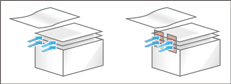
Setting Item | Values |
|---|---|
36: Setting | Off On |
Return Fan Shutter
Turn on or off the return fan shutter in Wide Large Capacity Tray. If [On] is set, the fan operates according to the paper fed timing. [Off] disables the fan operation.
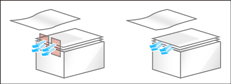
Setting Item | Values |
|---|---|
37: Setting | Off On |
Vacuum Fan Shutter
Turn on or off the vacuum fan shutter in Wide Large Capacity Tray. If [On] is set, the fan operates according to the paper fed timing. [Off] enables constant operation of the fan.
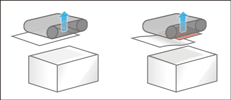
Setting Item | Values |
|---|---|
38: Setting | Off On |