


System Configuration
By connecting the machine to a DFE and client computer over a network, you can operate a printing system as shown below and control the machine to print documents using the control panel of the machine.
Also, you can view and operate the screen that is displayed on the control panel of the machine from another computer connected via the network in a web browser.
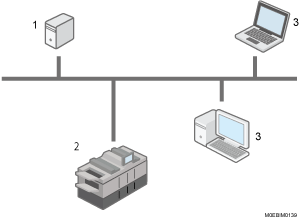
DFE (Digital Front End)
This device processes and forms images of the print data.
Device Unit (this Machine)
This device performs printing operations (feeding and transporting paper, and forming images). This device communicates with the DFE to obtain information, and delivers the UI contents for printing and configuring/adjusting various settings on the control panel of the machine and the client computer.
Client Computer
This is a computer that can connect to the machine over a network. You can perform the same operations as you perform on the control panel of the machine directly. It obtains the information from the machine over the network, and displays the UI content for printing and configuring/adjusting various settings in the web browser running on the client computer.