


Screen Configuration of [Schedule] Hub
Press [Schedule] on the navigation bar to display [Schedule] hub.
You can view or create working schedules such as printing or performing maintenance on the machine.
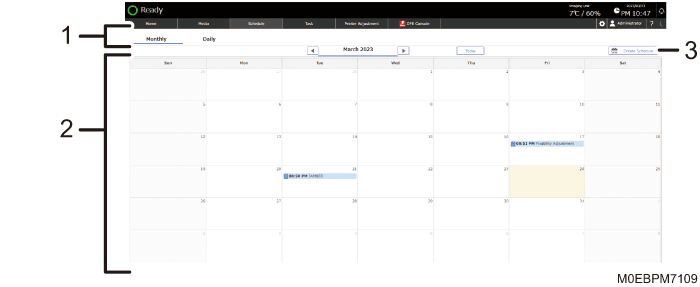
Monthly/Daily
Switches the display style of schedules between monthly (calendar view) and daily (list view).
Schedule
Displays Task schedules (Operational Task:
 Maintenance Task:
  ).
).Press a scheduled task to display its details.
[Implement]
Performs the scheduled task immediately.
[Change Scheduled Date]
Change the date and time the task is scheduled to be performed.
[Delete]
Deletes a scheduled task.
[Create Schedule]
Specify a date and time to create a new task. You can specify to repeat a task and receive a notification of a task. You can also specify the user to perform the task.
Performing a Scheduled Task
The "Schedule Notification" screen appears when it is time to start a task. Press [Implement Task] to perform the task.