Specifying Menu Protect
You can prohibit users except for the machine administrator from changing the settings of the Copier, Printer, and Scanner functions (Menu Protect).
-
You can also prohibit users except for the machine administrator from registering and changing the programs.
Registering/Changing/Deleting a Program that is Component of Frequently Used Settings

-
Enable Administrator Authentication for the machine administrator in advance.
Activating Administrator Authentication
-
Log in to the machine as the machine administrator on the control panel.
Logging in to the Machine as an Administrator
When custom-privileges administrators are registered, you can log in to the machine as a custom-privileges administrator with the Function Restriction privilege as well.
Logging in to the Machine as a Custom-Privileges Administrator -
On the Home screen, press [Settings].

-
Press [System Settings].

-
Press [Settings for Administrator]
 [Function Restriction] [Menu Protect].
-
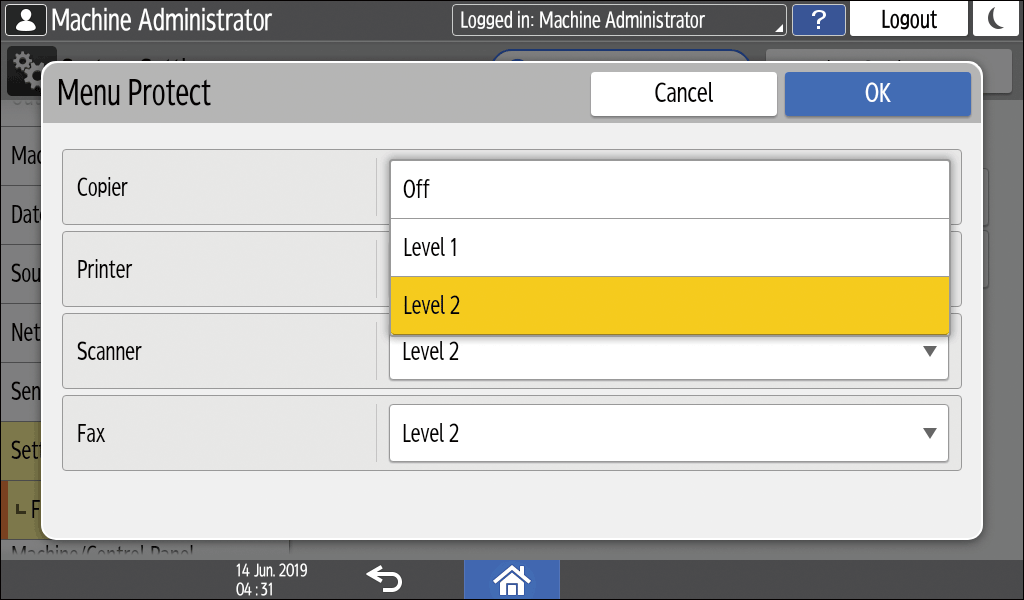
For each function, select the security level from the list.
-
Level 1/Level 2: Enables Menu Protect. Select [Level 2] to impose stricter restrictions. Required authority for each operation item varies according to the level.
For a list of settings that users can specify according to the menu protect level, see "Security Reference" on our website. -
Off: Disables Menu Protect.
-
-
Press [OK].
-
Press [Home] (
 ), and then log out of the machine.