Connecting a LAN Cable
To connect the machine to the network, use a LAN cable supporting 1000BASE-T, 100BASE-TX, and 10BASE-T.

-
When using a hub, use a hub that supports full-duplex communication. Half-duplex communication methods are not supported.
-
Turn off the power of the machine.
Confirm that the main power indicator on the control panel is unlit.
Turning On and Off the Power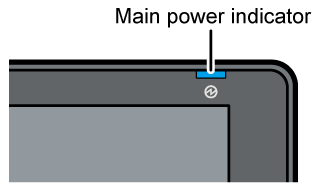
-
Connect the LAN Cable to the Ethernet interface of the machine.
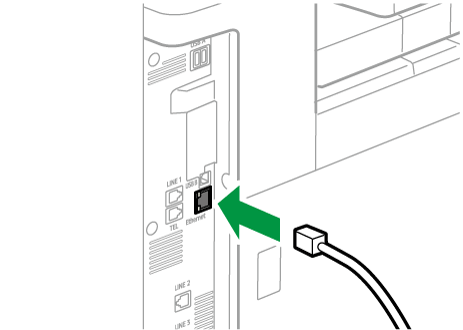
-
Connect the other end of the LAN cable to a network connection device such as a hub or router.
-
Turn on the power of the machine and confirm that the Ethernet interface LED lights up properly.
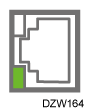
When the machine is connected to the network with 10BASE-T, the LED lights up in green.
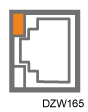
When the machine is connected to the network with 100BASE-TX, the LED lights up in orange.
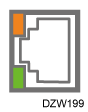
When the machine is connected to the network with 1000BASE-T, both LEDs light up.
-
The optional device server option is required to use this function.
Functions Requiring Optional Configurations
-
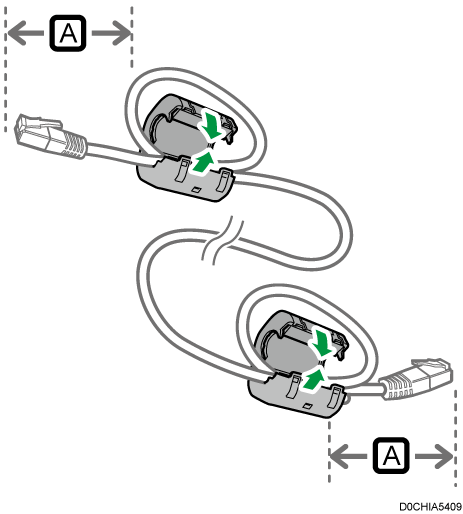
Make a loop at a distance of 3 cm (1.2 inches) (
 ) from each end of the LAN cable, and then attach the ferrite core provided with the machine to each loop.
-
Turn off the power of the machine.
Turning On and Off the Power -
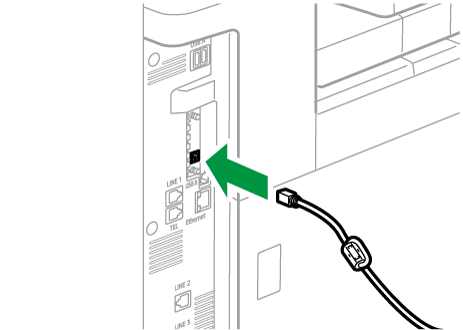
Connect the LAN cable to the Ethernet port of the device server option.
-
Connect the other end of the LAN cable to a network connection device such as a hub or router.
-
Turn on the power of the machine and confirm that the Ethernet interface LED lights up properly.
When the machine is connected to the network with 10BASE-T, the LED lights up in green.
When the machine is connected to the network with 100BASE-TX, the LED lights up in orange.
When the machine is connected to the network with 1000BASE-T, both LEDs light up.