Restricting Operations of the Customer Engineer without the Supervision of the Machine Administrator
You can restrict the customer engineer's access to the service mode when performing inspection or repair.
A customer engineer needs permission from the machine administrator to use the service mode. This ensures that the machine cannot be operated without the supervision of the machine administrator.
-
Log in to the machine as the machine administrator on the control panel.
Logging in to the Machine as an Administrator
When custom-privileges administrators are registered, you can log in to the machine as a custom-privileges administrator with the Security privilege as well.
Logging in to the Machine as a Custom-Privileges Administrator -
On the Home screen, press [Settings].

-
Press [System Settings].

-
Press [Settings for Administrator]
 [Security] [Service Mode Lock].
-
From the list next to Service Mode Lock, select [On].
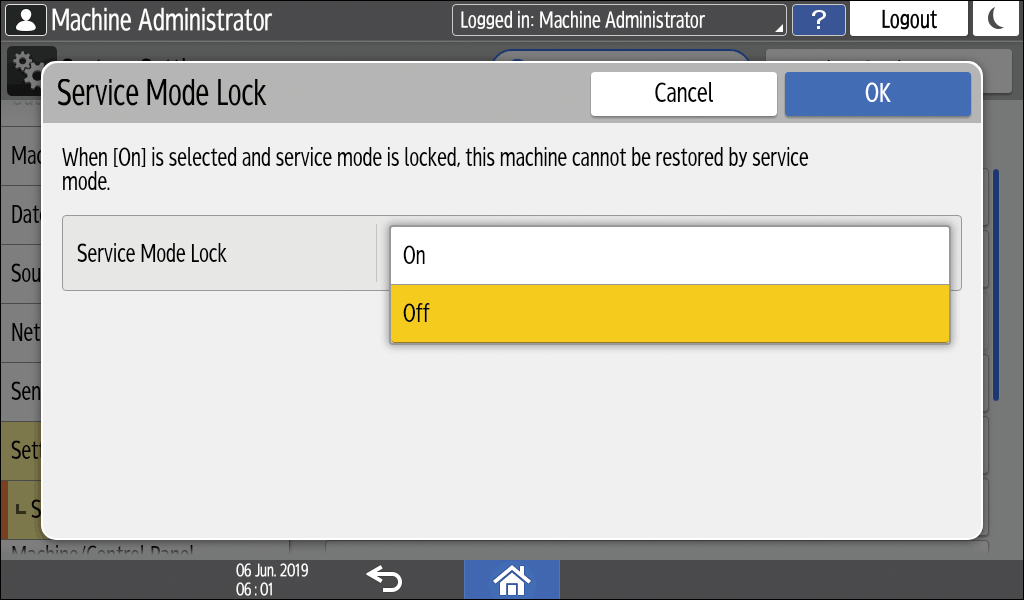
-
Press [OK].
-
Press [Home] (
 ), and then log out of the machine.