Sorting Printed Sheets by Individual Copies
While printing a document with multiple pages to make multiple printed sets, the machine assembles the printed sheets as sets in sequential order (Collate).
You can select the following Collate types:
|
Type |
Result |
|---|---|
|
Collate |
|
|
Rotating Collate*1 |
|
|
Shift Collate*2 |
|
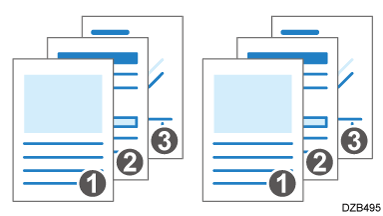
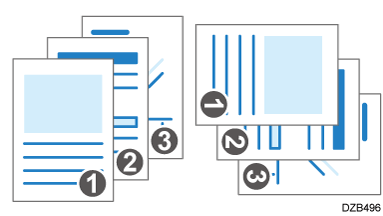
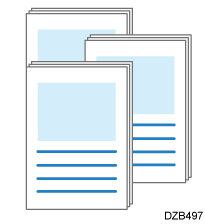
*1 Load papers of the same size in different orientations into two paper trays in advance.
*2 The paper size and paper weight supported by Shift Collate differ depending on the output tray or finisher attached to the machine.
Recommended Paper Sizes and Types

- An optional unit such as the shift tray or finisher is required to use this function.
Functions Requiring Optional Configurations
Configure the settings on the [Finishing] tab.
-
Open a document to print on the computer, and display the setting screen of the printer driver from the print menu in the application.
-
Specify Document Size, Paper Type, Orientation and other settings.
Basic Procedure for Printing Documents -
On the [Finishing] tab, specify the Collate method.
Configure the following setting:-
Collate: Select [Printer Collate] in normal use to adopt the Collate setting of the printer driver. To use the Collate setting specified in the print dialog box of the application, select [Same as Application].
-
-
After completing the configuration, click [OK] to print.
Configure the settings in the [Paper Handling] menu.
-
Open a document to print on the computer, and display the setting screen of the printer driver from the print menu in the application.
-
Specify Paper Size, Orientation, Paper Type, and other settings.
Basic Procedure for Printing Documents -
On the [Paper Handling] menu, select [Collate pages].
Cancel the collate setting in the application. -
After completing the configuration, click [Print] to print.