



 Previous
The machine is equipped with a help function.
Using the help function, you can refer to information about the machine's functions and how to use the machine.
Before using the help function
To use the help function, the machine needs to be connected to the Internet.
Depending on your network environment, you may need to configure proxy.
For details about network settings and proxy settings, see Connecting the Machine/ System Settings.
Depending on your language, refer to the English manual.
When you finish the settings, turn off the machine, and then turn it back on.
Using the help function
You can display the [Help] screen by pressing the help icon on the upper right of the screen.
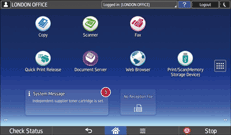
On the [Help] screen, you can refer to FAQs about the screen on which you pressed the help icon.
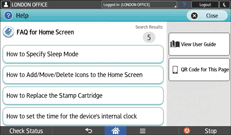
When you want to display the [Help] screen on your smart device, press [QR Code for This Page], and then read the QR code displayed on the screen with your smart device.
When you press [View User Guide], you can refer to the operating manual for the machine.

Depending on the language you are using, the [Help] screen is displayed in English.


