




Creating and Installing a Device Certificate from the Control Panel (Self-Signed Certificate)
 Previous
Create and install the device certificate using the control panel.
This section explains the use of a self-signed certificate as the device certificate.
 Log in as the network administrator from the control panel.
 Press [System Settings].
 Press [Administrator Tools].
 Press [
 Next] 3 times.
 Press [Program / Delete Device Certificate].
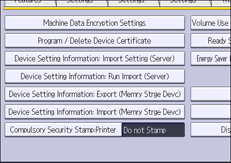
 Check that [Program] is selected.
 Press [Certificate 1].
Only [Certificate 1] can be created from the control panel.
 Configure the necessary settings.
 Press [OK].
"Installed" appears under "Certificate Status" to show that a device certificate for the machine has been installed.
 Log out.

If you perform the procedure for device certificate installation when there is an already installed device certificate, the device certificate is overwritten.
Select [Delete] to delete the device certificate from the machine. When the AirPrint function is enabled on the machine and [Certificate 1] is deleted, the machine detects the deletion and creates another device certificate automatically.
To use the device certificate created on the machine, set "Certification" in Web Image Monitor to [Certificate 1].


