




 Previous
Import device information saved on an SD card.
 Log in from the control panel as an administrator with user administrator, machine administrator, network administrator, and file administrator privileges.
 Press [System Settings].
 Insert an SD card into the media slot on the side of the control panel.
For details about inserting the SD card, see "Inserting/Removing a Memory Storage Device", Getting Started.
 Press [Administrator Tools].
 Press [
 Next] 3 times.
 Press [Device Setting Information: Import (Memry Strge Devc)].
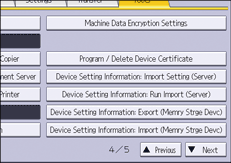
 Configure the import conditions.
Press [Select] of the "Device Setting Info. File" to select the file(s) to import.
Specify whether to [Include] or [Exclude] the "Device Unique Information". "Device Unique Information" includes the IP address, host name, fax number, etc.
Enter the encryption key that was specified when the file was exported.
 Press [Run Import].
 Press [OK].
 Press [Exit].
The machine restarts.

If import or export fails, you can check the log for the error. The log is stored in the same location as the exported device setting information file.


