




 Previous

|
 Cancel all custom paper profiles allocated to paper trays.
 Display the initial settings screen.
When using the standard operation panel
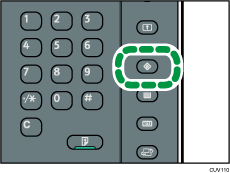
Press the [User Tools] key.
When using the Smart Operation Panel
Press [Home] (
 ) at the bottom of the screen in the center.
Press the [User Tools] icon (
 ) on the [Home] screen.
Press [Machine Features].
 Press [Adjustment Settings for Operators].
 Press [Machine: Maintenance].
 Press [Back Up / Restore Custom Paper Data].
 Insert the SD card containing the backup custom paper profiles into the media slot on the side of the control panel.
 Press [Restore Custom Paper Settings].
 Press [OK].
 Press [Exit].

All custom paper profiles registered in the machine are overwritten during the data restoration.
The backup data is restored under the registration number allocated at the time of the back-up.


