




 Previous
The counter displays the total number of pages used by each of the functions.
You can also print out the counter information.
 Display the [Counter] screen.
When using the standard operation panel
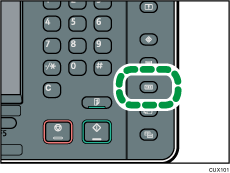
Press the [Counter] key.
When using the Smart Operation Panel
Press [Home] (
 ) at the bottom of the screen in the center.
Press the [User Tools] icon (
 ) on the [Home] screen.
Press [Counter].
 To print a counter list, press [Print Counter List], and then press the [Start] key.
 Close the [Counter] screen.
When using the standard operation panel
Press the [Counter] key.
When using the Smart Operation Panel
Press [User Tools] (
 ) on the top right of the screen.
Press [Home] (
) at the bottom of the screen in the center.


