




 Previous
This section describes the output tray settings.
Depending on the options installed on the machine, some trays might not be displayed.
When the finisher is installed, [Finisher Shift Tray] and [Finisher Upper Tray] are displayed.
When the stacker is installed, [Stacker Upper Tray] and [Stacker Tray] are displayed. However, the stacker upper tray is unavailable when finisher is installed with the stacker.
When the second stacker is installed and [According to Function Setting] is selected for [Output Tray Setting], [Second Stacker Tray] is displayed.
If you select a setting that uses the finisher, the job might not be delivered to the specified output tray.
If you select stapling or punching, the job will be delivered to the finisher upper tray or the finisher shift tray.
If you select shift-sorting, the job will be delivered to the finisher shift tray.
If you select center stapling, the job will be delivered to the finisher booklet tray.
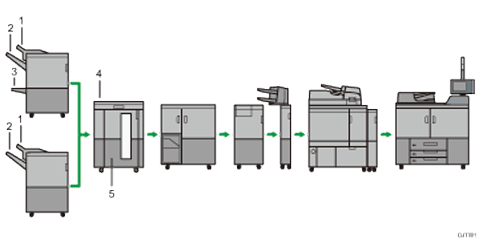
Finisher Upper Tray
Finisher Shift Tray
Finisher Booklet Tray
Stacker Upper Tray
Stacker Tray/Second Stacker Tray

When the second stacker is installed, [Second Stacker Tray] is displayed.


