




 Previous
Select the paper type according to the paper weight when copying onto thick paper.
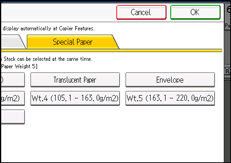
Paper Weight 4: 105.1–163.0 g/m2 (28.1 lb. Bond–60.0 lb. Cover)
Paper Weight 5: 163.1–220.0 g/m2 (60.1–80.9 lb. Cover)
 Load the paper face up in the multi bypass tray (Tray 7).
 Press [Tray 7].
 Press [Paper Size].
 Specify the paper size, and then press [OK].
 Press [Special Paper].
 Select a paper weight, and then press [OK].
 Place the originals, and then press the [Start] key.

You can also load thick paper into the paper trays and make copies on it. Be sure to specify the paper type under [Tray Paper Settings]. For details, see "Changing Tray Paper Settings", Paper Settings.


