


 Previous
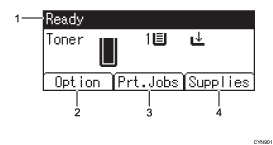
Operational Status or Messages
Displays the printer status and messages.
[Option]
Press to display the following items:
Form Feed
Error Log
[Prt.Jobs]
Press to display print jobs sent from a computer.
[Prt.Jobs] is displayed only when the optional hard disk is installed in the printer.
[Supplies]
Press to display the information about printer supplies.

By default, the remaining amount of toner is displayed. To avoid displaying the remaining amount of toner, set [Display Supply Info] to [Off] in [General Settings] under [Maintenance].


