


 Previous
This section explains how to identify the machine's interface and connect the machine according to the network environment.
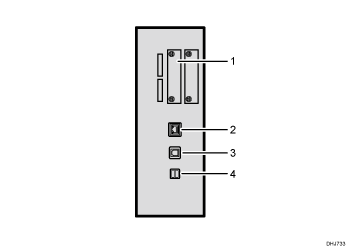
Wireless LAN port (optional)
Port for using a wireless LAN
Gigabit Ethernet port
Port for using a 1000BASE-T, 100BASE-TX, or 10BASE-T cable
Use this interface to connect the machine to a network.
If you use an Ethernet interface cable that supports 1000BASE-T, set [Ethernet Speed] to [Auto Select: Enable 1Gbps] in [Interface Settings] in [System Settings].
USB 2.0 [Type B] port
Port for connecting a USB2.0 [Type B] interface cable
This interface allows the machine to print over USB connection.
USB Host Interface
Port for connecting a USB interface cable or USB interface device
Use this interface to connect the machine to a card authentication device or external keyboard.

The Gigabit Ethernet port and Wireless LAN interface unit cannot be used simultaneously. If the optional Wireless LAN interface unit is installed, you need to set [LAN Type] to [Wireless LAN] in [Interface Settings] in [System Settings].


