




 Previous

|
|
|
|

Be careful when moving the machine. Take the following precautions:
Turn off the main power. For details about how to turn the main power off, see Turning off the main power.
Close all covers and trays, including the front cover and bypass tray.
To move the machine, two people are needed, one at the front and one at the back.
Carry the machine like this.
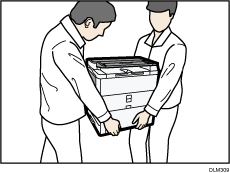
With the paper tray unit attached
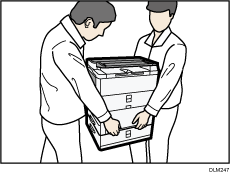
Do not carry the machine like this.
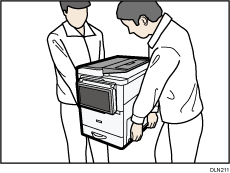
Keep the machine level and carry it carefully, taking care not to jolt or tip it. Rough handling may cause a malfunction or damage the hard disk or memory, resulting in loss of stored files.
Protect the machine from strong shocks. Impact can damage the hard disk and cause stored files to be lost. As a precautionary measure, files should be copied to another computer.
When moving the machine, do not press against the ADF. Pressing on the ADF bends it in relation to the machine, which may cause scanned and copied images to be distorted.


