


 Previous
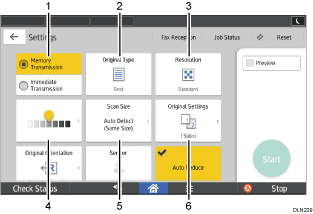
You can switch Screens 1 to 4 described in this section by flicking the screen up or down.
1
No. |
Icon |
Description |
|---|---|---|
1 |
|
You can switch to Immediate Transmission mode. Unless immediate transmission is selected, Memory Transmission mode is selected by default. |
2 |
|
You can select an original type that is suitable for your originals. |
3 |
|
Press to select the resolution according to the size of the text on your original. |
4 |
|
Press to specify the density to scan the original. You can also specify the density by touching the |
5 |
|
Press to select the scanning size of the original. |
6 |
|
Press to select the sides of the original |



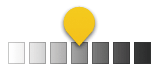
 icon and dragging it right or left.

2
No. |
Icon |
Description |
|---|---|---|
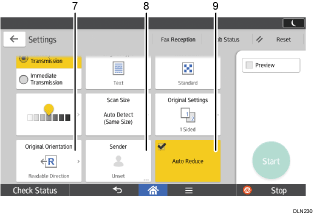
7 |
|
Press to select the orientation of the original. |
8 |
|
Press to specify the sender. |
9 |
|
Page separation and length reduction |


3
No. |
Icon |
Description |
|---|---|---|
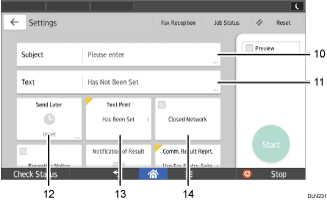
10 |
|
Specify the Internet Fax/E-Mail subject |
11 |
|
Specify the Internet Fax/E-Mail Text |
12 |
|
You can specify settings to automatically send files directly at a specified time. |
13 |
|
You can select a standard message to be printed. |
14 |
|
You can send files over a closed network. |


4
No. |
Icon |
Description |
|---|---|---|
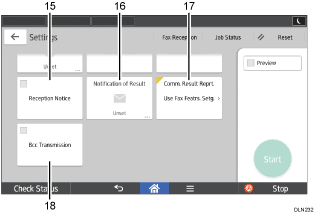
15 |
|
Requesting reception confirmation |
16 |
|
You can receive a transmission notification by e-mail |
17 |
|
Once memory transmission is complete, you can have the result printed. |
18 |
|
Specifying Internet Fax/e-mail destinations as BCC addresses |