


 Previous
This section explains how to specify the size for a custom size roll of paper from the control panel when using RP-GL/2 or RTIFF as a printer language.
For details about how to change the printer language, see "Specifying a Printer Language", RP-GL/2 and RTIFF.
Paper sizes that can be specified are 210–914.4 mm (8.3–36.0 inches) horizontally and 210–15000 mm (8.3–590.5 inches) vertically. (Type 1)
Paper sizes that can be specified are 210–914.4 mm (8.3–36.0 inches) horizontally and 210–30000 mm (8.3–1181.1 inches) vertically. (Type 2)
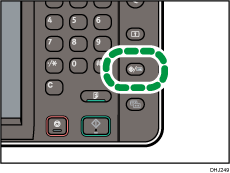
 Press the [User Tools/Counter] key.
 Press [Printer Features].
 Press [System(EM)].
 Select [Custom Size: Tray 1-4].
 Enter the horizontal size of the paper using the number keys, and then press [
 ].
].
 Enter the vertical size of the paper using the number keys, and then press [].
 Press [OK].
 Press the [User Tools/Counter] key.


