


 Previous

|
Front and left view
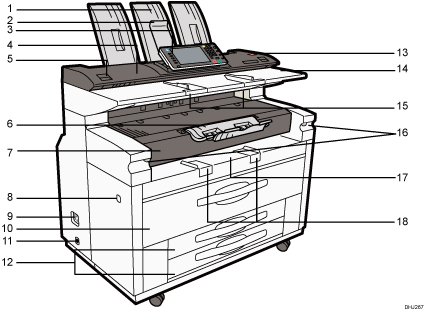
Upper output stacker
When the upper output is selected, output paper is stacked here.
Original Output to Upper Front Auxiliary Tray
If the original output to upper front auxiliary tray is lowered to the front and the machine settings are specified to deliver originals from the upper paper exit, delivered originals are stacked here.
Control panel
See Guide to the Names and Functions of the Machine's Control Panel.
Scanner cover
This protects the original feed mechanism and the scanning glass.
Scanner cover release lever
Use to open the scanner cover to clear jammed originals or to clean the machine.
Front output auxiliary tray
This can be used to receive the delivered copies.
Front Cover
Open this cover to replace toner.
Main power switch
To operate the machine, the main power switch must be on. If it is off, turn the switch on.
Earth Leakage Breaker
To prevent electric shock this machine has an earth leakage breaker. The earth leakage breaker is normally in the on position.
If the power does not come on, check if the earth leakage breaker is in the off position. If so, do not turn it to the on position.
Contact your sales or service representative immediately.
Upper tray
Stores Paper Roll 1 (foreside) and Paper Roll 2 (inner side).
Anti-condensation heater switch
If condensation forms inside the machine as a result of temperature change, the machine may not print properly. To minimize this problem, use the anti-condensation heater.
Paper roll tray (optional) or Cut paper trays (optional)
The illustration shows the cut paper trays.
Stores Paper Roll 3 (foreside) and Paper Roll 4 (inner side) if the paper roll tray is attached.
If the cut paper tray is attached, it stores the cut paper in Tray 3 (top tray) and Tray 4 (bottom tray).
[Scanner Stop] key
Use if originals are feeding in slanted, or to cancel scanning while an original is feeding in. You can also use this to release the paper edge hold function.
Original table
Place originals here scanning side up.
Original guide
Set to the width of your originals.
Imaging unit release lever
Use this lever to open the imaging unit when clearing paper jams inside or cleaning the machine.
Do not leave the imaging unit open for 5 minutes or longer. Otherwise, copy quality may deteriorate.
While holding down the imaging unit, pull the release lever to open it.
Bypass Tray
Use to feed paper in manually. Load paper print side up.
Paper bypass's paper guide
Set to the width of the paper for bypass copying.
Rear and left view
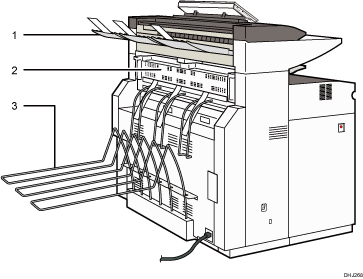
Rear original exit (straight)
Holds originals ejected at the back of the machine.
The rear original exit is used when the stacker is attached to the back of the machine. For details, contact your sales or service representative.
Fusing unit cover
Protects the fusing unit.
Rear output
Stacks copies delivered to the rear output.

The fan inside the machine near the vents may continue running to cool the machine. For details, see "When Other Messages Appear", Troubleshooting.


