


 Previous
When copying custom size originals, specify the size of the originals.
With Type 1, originals that have a vertical dimension of 182–15,000 mm (7.2–590.5 inches) and a horizontal dimension of 210–914 mm (8.3–36.0 inches) can be placed with this function. With Type 2, originals that have a vertical dimension of 182–30,000 mm (7.2–1181.1 inches) and a horizontal dimension of 210–914 mm (8.3–36.0 inches) can be placed with this function.
With Type 1, the size range of copy paper is 210–15,000 mm (8.3–590.5 inches) vertically and 210–914.4 mm (8.3–36.0 inches) horizontally. With Type 2, the size range of copy paper is 210–30,000 mm (8.3–1181.1 inches) vertically and 210–914.4 mm (8.3–36.0 inches) horizontally.
 Press [Special Original].
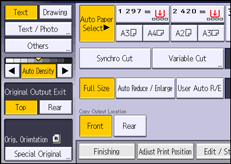
 Press [Custom Size Original].
 Enter the horizontal size with the number keys, and then press [
 ].
].
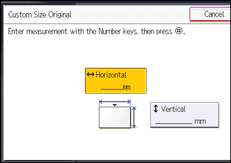
 Enter the vertical size with the number keys, and then press [].
 Press [OK] twice.


