


 Previous
This section explains how to setup a wireless LAN interface.
Two methods of setting up wireless LAN are available: automatic setup by using WPS (Wi-Fi Protected Setup), and manual setup by entering required information such as SSID.
To configure the wireless LAN settings manually, display the screen for Wireless LAN configuration, and then use the following procedure:
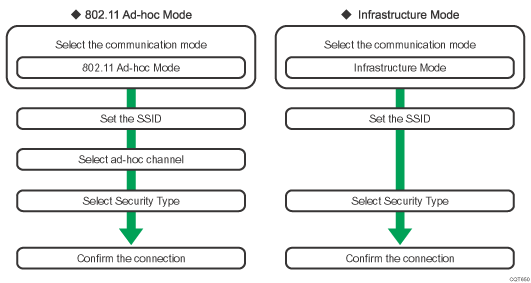
For details about how to specify wireless LAN settings from the control panel on the printer, see Wireless LAN Configuration.
For details about how to specify wireless LAN settings automatically, see Configuring a wireless LAN using Easy Setup.

When [802.11 Ad-hoc Mode] is selected in Communication Mode, select the channel for [Ad-hoc Channel]. Set a channel that matches the type of wireless LAN being used. For details about setting the Ad-hoc Channel, see Wireless LAN Configuration.
For details about security type settings, see Security Guide.


