


 Previous
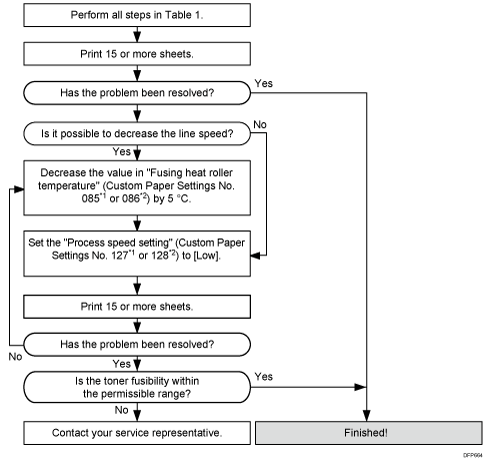
Settings to adjust |
What to do |
|---|---|
090: [Adj Fsng Tmp to Trnsf Ppr: Ppr: Qual] 092: [Adj Fsng Tmp to Trnsf Ppr:Ppr: Qual: S]*3 |
Increase the value by 1. |
093: [Adjust Adding Fusing Temperature 1] 094: [Adjst Addng Fusng Tempratre 1: Special]*3 |
Set to 0 degrees. |
095: [Adjust Adding Fusing Temperature 2] 096: [Adjst Addng Fusng Tempratre 2: Special]*3 |
When 127: [Process Speed Setting: Productivity] or 128: [Process Speed Setting: Quality] in [Advanced Settings] for the custom paper you are using is set to [High] or [Middle], set the value to 15 degrees. When 127: [Process Speed Setting: Productivity] or 128: [Process Speed Setting: Quality] is set to [Low], set the value to 5 degrees. |
131: [Rdc. Init. CPM: Low Tmp. Envir.: Prod.]*2 132: [Rdc. Init. CPM: Low Tmp. Envir.: Qual.]*1 |
Set to [Reduce Level 3]. |
133: [Rdc. In. CPM: N./H. Temp. Envr.: Prod.]*2 134: [Rdc. In. CPM: N./H. Temp. Envr.: Qual.]*1 |
Set to [Reduce Level 3]. |
*1: Printing in full color including the clear toner and the special color is set to high quality/printing in full color including the white toner
*2: Printing in full color/Printing in black and white/Printing in full color including the clear toner while the special color is not set to high quality
*3: Special color mode is available for Pro C7100X, Pro C7110X, Pro C7100SX, and Pro C7110SX.

After performing the solution, it is recommended to perform the color calibration of the external controller.
Check the toner fusibility as follows:
The printed image does not come off.
The toner does not come off even if it is lightly rubbed by a nail.
The toner does not come off even if it is rubbed by the cloth for cleaning the contact glass.


