


 Previous
When loading paper larger than A4 or 81/2 × 11 into Tray 1, extend the tray.
 Pull the tray out of the printer.
For details, see Steps 1 and 2 on Loading Paper into Paper Trays.
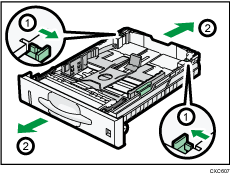
 Slide the catches inwards to unlock the tray, and then slide the tray until it stops.
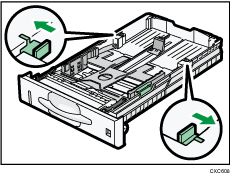
 Return the catches to the positions where they lock.

When loading A4
, 81/2 × 11, or smaller paper, do not extend the tray. Otherwise, a paper jam may occur.


