


 Previous
This section explains the settings you need to configure if you want to scan a large number of originals in several batches and send them together as a single job.

For details about the optional units required for this function, see "Functions Requiring Optional Configurations", Getting Started.
Batch
Scanning starts when you place additional originals and press the [Start] key. When all the originals have been scanned, press the [ ] key. The machine waits until additional originals are placed, regardless of the default settings.
 Press [Send Settings].
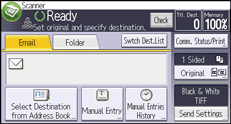
 Press [
 ] three times and then press [Batch].
 Press [OK].

For more detailed procedure of scanning a large number of originals, see Scanning a Multiple-page Original as One File
 .
.


