




 Previous
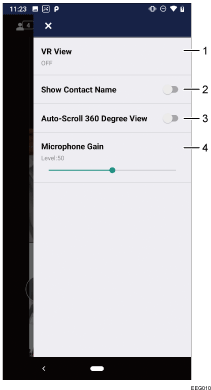
Tap  in the upper right of the screen during a meeting to display the menu.
No. |
Icon |
Descriptions |
|---|---|---|
1 |
VR View |
Each time it is tapped, this function switches through Single Lens, Twin Lenses, and OFF. When set to [Single Lens] while receiving a 360-degree video, the video is displayed in synchronization with the movement of the terminal. When set to [Twin Lenses], a 360-degree video in synchronization with movement of the terminal is displayed as a stereogram that can be viewed in 3D. When set to [OFF], the viewing direction of a 360-degree video can be changed by swiping it. |
2 |
Show Contact Name |
Each time it is tapped, this function switches between ON and OFF. When set to [ON], a contact name is displayed at the bottom of a video from the contact. |
3 |
Auto-Scroll 360 Degree View |
Each time it is tapped, this function switches between ON and OFF. When set to [ON], the 360-degree video display automatically rotates. You can move the display area during the rotation by swiping the screen. |
4 |
Microphone Gain |
Used to adjust the input sensitivity of the microphone. Use this function when you want to increase the sensitivity of audio input or when contacts cannot hear audio from you. To pick up more ambient sound, move the slide to the right to increase the sensitivity. Please note that when the gain of the microphone is too high, audio clipping may occur. |


