




 Previous

You must change the default password and register an e-mail address the first time you log in to the product. For details, see Changing the Default Password and Registering an E-mail Address.
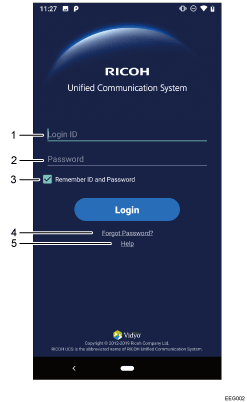
No. |
Item |
Descriptions |
|---|---|---|
1 |
Login ID (Contact ID) |
Enter the 12-digit ID for this product. This is the ID that was provided when you purchased the product. The product at each location is identified by a Contact ID. This ID acts as the destination for meetings and the account information in RICOH Unified Communication System Settings. |
2 |
Password |
Enter the login password, which consists of eight alphanumeric characters or more. When using this product for the first time, enter the default password that is provided when you purchased the product. |
3 |
Remember ID and Password |
When checked, the next time the system is started the screen is displayed with the contact ID and password field filled in. |
4 |
Forgot password? |
When clicked, the screen is displayed and you can reset the password. |
5 |
Help |
Displays a page containing frequently asked questions related to the RICOH Unified Communication System. |


